Running a Ghost Blog in Kubernetes

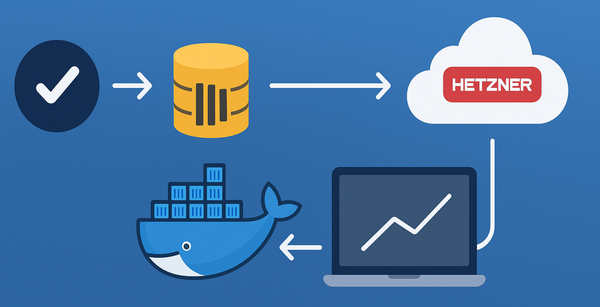
This blog runs on Ghost 6, but the more interesting half of the story is the infrastructure underneath it. A Kubernetes cluster on Hetzner Cloud, deployed from a private infrastructure git repo, with Docker image upgrades flowing in automatically from Docker Hub. This post walks through how the stack actually works, with attention paid to the parts that took longer to get right than expected.
The stack in one paragraph
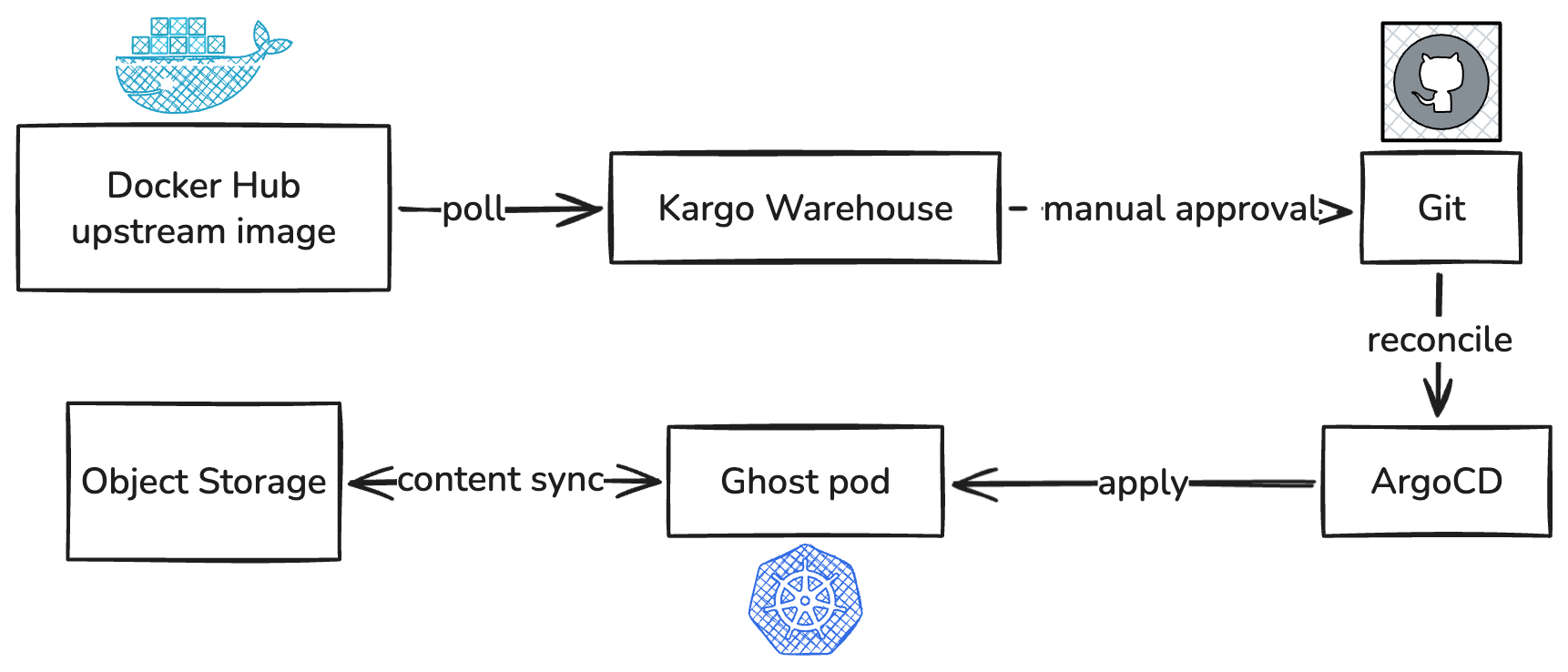
The cluster runs on Hetzner Cloud (kops-managed). All traffic enters through a single Hetzner load balancer that frontends NGINX Gateway Fabric, which speaks the Kubernetes Gateway API rather than the older Ingress. cert-manager handles TLS via Let's Encrypt. ArgoCD reconciles every application from a single Git repo. Kargo polls Docker Hub for new Ghost images and opens commits when it sees one. Logs flow through Promtail to Loki, secrets are SealedSecrets, and Ghost itself runs as a small Helm chart I wrote.
That's the whole stack. Most of the actually-interesting work was figuring out how to run Ghost without losing data.
The storage problem
Ghost expects a writable filesystem for /var/lib/ghost/content — themes, uploaded media, and the data directory it uses for various caches. The obvious answer is a PersistentVolumeClaim. I had one originally. The catch is that Hetzner Cloud volumes are ReadWriteOnce, which means the pod is pinned to whichever node the volume is attached to. If anything goes wrong with that node, the pod can't reschedule until the volume detaches and reattaches elsewhere — a process measured in minutes, not seconds.
The replacement is a regular emptyDir volume backed by S3. Content is handled through three components in the pod. An init container runs at pod start and uses rclone to download the entire content tree from a Hetzner Object Storage bucket into the freshly-empty /data directory. A sidecar container runs alongside Ghost; every fifteen minutes, it uses rclone to sync /data back to S3. The Ghost container itself reads and writes /data normally — it has no idea any of this is happening.
spec:
  initContainers:
    - name: s3-download
      image: rclone/rclone:1.68
      # rclone sync s3://...  ->  /data
  containers:
    - name: ghost
      image: ghost:6.37.1
      volumeMounts:
        - name: ghost-content
          mountPath: /var/lib/ghost/content
    - name: s3-sync
      image: rclone/rclone:1.68
      # every 15 min: rclone sync /data  ->  s3://...
  volumes:
    - name: ghost-content
      emptyDir:
        sizeLimit: 5Gi
This works. The pod can reschedule freely; whichever node it lands on, init pulls fresh content from S3 and Ghost starts. Hetzner Object Storage is cheaper than a PVC and is effectively unlimited.
But it took three layers of guards to get the data integrity right.
Three layers of data integrity guards
The naive version had several failure modes, all of which I hit at least once.
Layer 1: serialise the storage path
Kubernetes's default RollingUpdate strategy starts the new pod before fully terminating the old one. With a single replica and emptyDir-backed storage, this means two pods are briefly alive at the same time, both writing to S3. Whichever finishes its sync last wins, and the other's writes are gone.
The fix is to switch the Deployment strategy to Recreate.
spec:
  replicas: 1
  strategy:
    type: Recreate
The old pod terminates fully before the new one starts. There are a few seconds of visible downtime during deploys, but the storage path is serialised.
Layer 2: refuse to mirror a broken state
If the init container fails — transient S3 read error, network blip, IAM permissions hiccup — the pod might end up with /data empty. Fifteen minutes later, the sidecar's loop wakes up, runs rclone sync /data/ to S3, and dutifully deletes everything in S3 to mirror the local state. Then the next pod start pulls from an empty S3, and the blog is gone.
Two safeguards close this. A tripwire file: the init container writes /status/init-ok on success, and the sidecar refuses to run any sync unless the marker exists. If init fails, the sidecar exits immediately rather than doing anything destructive. And a deletion cap: the sidecar's sync uses --max-delete 5, so even if everything else fails, a single sync cycle can't delete more than five files. Worst-case loss is bounded.
rclone sync -v s3:bucket/path/ /data/

# Tripwire: signal init success. Sidecar refuses to sync without this.
touch /status/init-ok
End of init container script
if [ ! -f /status/init-ok ]; then
  echo "ERROR: tripwire missing — refusing to sync"
  exit 1
fi

while true; do
  rclone sync -v --max-delete 5 /data/ s3:bucket/path/
  sleep 900   # 15 minutes
done
Sidecar startup + sync loop
Layer 3: Catch the deploy window
Even with everything above working, there's a window between the last periodic sync and the moment the pod terminates. If you upload an image at 11:01 and a deploy restarts the pod at 11:02, the periodic sync ran at 11:00 — your image hasn't reached S3 yet, and the new pod's init container pulls a now-stale state.
The fix is a preStop lifecycle hook on the sidecar. When Kubernetes signals the pod to terminate, the sidecar runs one final rclone sync before the container is killed. The pod's terminationGracePeriodSeconds is bumped to 120 to give it time.
spec:
  terminationGracePeriodSeconds: 120
  containers:
    - name: s3-sync
      lifecycle:
        preStop:
          exec:
            command:
              - /bin/sh
              - -c
              - |
                exec > /proc/1/fd/1 2>&1   # make preStop logs visible
                echo "[preStop] waiting 5s for ghost to flush"
                sleep 5
                rclone sync -v --max-delete 5 /data/ s3:bucket/path/
There's a subtlety worth knowing: preStop hooks fire in parallel across all containers in a pod. So when the sidecar's preStop starts syncing, Ghost is also receiving SIGTERM. Without coordination, the sidecar could capture partially written files. So the preStop starts with a five-second sleep, letting Ghost finish in-flight requests before the sync begins.
One Kubernetes quirk that cost me a frustrating debugging session: preStop hook stdout/stderr is not captured in the container's log stream by default. Kubelet runs the hook out-of-band via the CRI ExecSync API; the output goes to kubelet's own logs on the node, not to your pod's logs. The workaround is to redirect the script with exec to /proc/1/fd/1 to send output to PID 1's stdout, which IS captured. After that, every line shows up in kubectl logs Loki normally.
What this stack doesn't protect against is hard kills. If the node loses power or the kernel panics, the preStop hook never fires. The fifteen-minute periodic sync is the only safety net for that — bounded data loss, not zero.
A war story: the probe redirect loop
After adding standard liveness, readiness, and startup probes, the pod refused to come up. The startup probe failed with a strange error: kubelet reported it was receiving a redirect to an HTTPS URL that Ghost wasn't serving on that port. The probe spec was plain HTTP, so why was kubelet making an HTTPS request?
The answer is in Ghost's middleware. Ghost is configured with the URL: https://chekkan.com. When kubelet hit http://<pod-ip>:2368/Ghost's URL-redirects middleware saw that the request came over HTTP and the host didn't match the canonical URL, so it returned a 301 to https://<same-host>:2368/ — a same-host scheme-upgrade redirect. Kubelet's HTTP probe does follow same-hostname redirects (only different-hostname ones are rejected). It retried on the HTTPS URL, which Ghost couldn't serve — port 2368 is HTTP-only, and the probe failed.
The fix is two-part. The startup probe is now a plain TCP check on port 2368, avoiding HTTP semantics during boot entirely. The readiness and liveness probes still use HTTP, but with Host: chekkan.com and X-Forwarded-Proto: https headers added. Ghost trusts X-Forwarded-Proto (Express's trust proxy is on by default) and sees the host is canonical, so it returns 200 instead of redirecting. This matches the request shape NGINX Gateway sends in production.
startupProbe:
  tcpSocket:
    port: 2368
  failureThreshold: 30
  periodSeconds: 10
readinessProbe:
  httpGet:
    path: /
    port: 2368
    httpHeaders:
      - name: Host
        value: chekkan.com
      - name: X-Forwarded-Proto
        value: https
  periodSeconds: 10
livenessProbe:
  httpGet:
    path: /
    port: 2368
    httpHeaders:
      - name: Host
        value: chekkan.com
      - name: X-Forwarded-Proto
        value: https
  periodSeconds: 30
  failureThreshold: 3
Image upgrades, automated
Bumping Ghost from 6.22.1 to 6.37.1 used to be a manual two-line PR. Now, a Kargo Warehouse is watching docker.io/library/ghost, configured with a SemVer selection strategy and a constraint of ^6.0.0. When Ghost 6.38.0 lands, Kargo detects it within twelve hours and surfaces it as Freight in the Kargo UI. I read the changelog, click Promote, and Kargo opens a commit on main, bumping the image tag in the ArgoCD app manifest. ArgoCD syncs.
apiVersion: kargo.akuity.io/v1alpha1
kind: Warehouse
metadata:
  name: ghost
  namespace: ghost
spec:
  interval: 12h
  subscriptions:
    - image:
        repoURL: docker.io/library/ghost
        imageSelectionStrategy: SemVer
        semverConstraint: ^6.0.0
        allowTags: '^\d+\.\d+\.\d+$'
The semver cap to ^6.0.0 is deliberate. Ghost 7.x will eventually have breaking theme-API changes; I want to see it as available Freight, but I want to opt in to majors deliberately. Auto-promotion is also off — Ghost is a third-party image, and I don't want a bad release auto-deploying before I've read the notes.
What I learned
A few things stand out from this exercise.
Kubernetes' lifecycle is forgiving but not magical. Probes, preStop hooks, grace periods, termination ordering — all of these have specific semantics that bite if you don't read carefully. The defaults are fine for stateless web apps and surprising for anything that writes to disk.
preStop logs are invisible by default. That cost me an hour of "is this even firing?" debugging. The /proc/1/fd/1 redirect trick should be in every preStop hook from now on.
exec > /proc/1/fd/1 2>&1The cost of GitOps consistency is real, but compounding. Every change to chekkan.com is a PR. There's friction. But the same friction that makes a bad change harder to ship makes a good change easy to audit — there's a paper trail, a bisect is a one-liner, and a cluster rebuild is nearly automated.